
How It Works
One Gate, Mapped Straight to
Your CMS Item
Every PDF gets a Gated ID. Point that ID at a CMS field or an existing form, and the lock widget takes over the rest of the page.
- 01
Connect Your Webflow Workspace
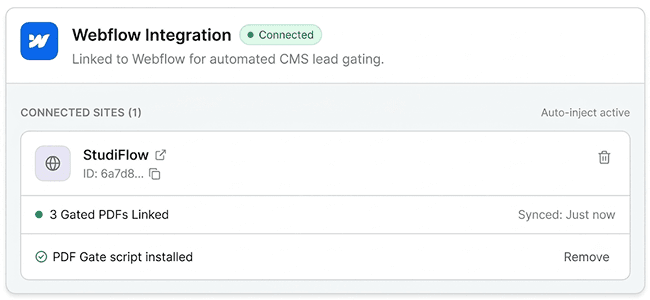
Authorize Webflow and pick your site. PDF Gate adds its script for you, so there is nothing to paste.
- 02
Upload Your PDFs
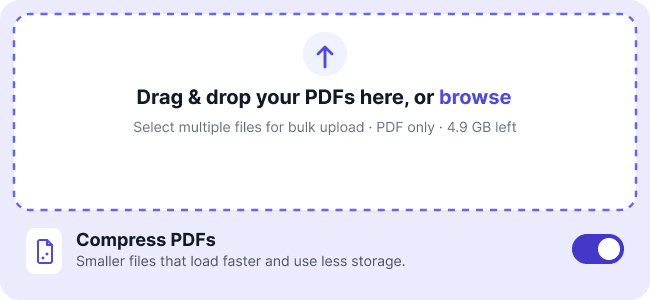
Drop in one file or many at once. Each file is checked to be a real PDF and stored privately.
- 03
Map It to a CMS Item or Form
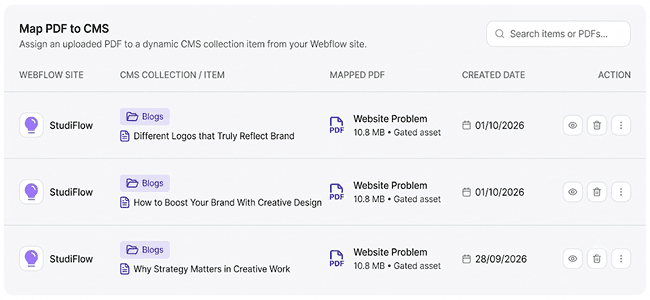
Point the PDF's Gated ID at a CMS field or attach it to a form in the Webflow Designer.
- 04
Publish and Collect Leads
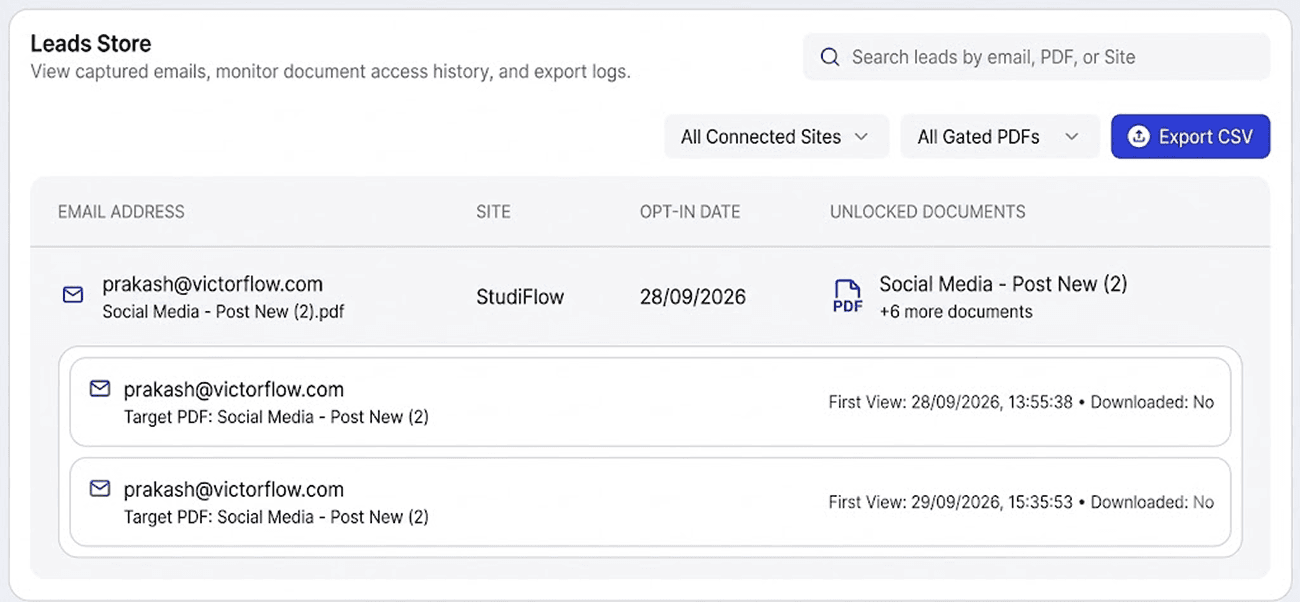
Visitors enter their email to unlock the PDF, get a copy by email, and land in your leads table.
Features
Everything You Need to Gate,
Deliver and Measure
From the lock card to the lead export, every part of the flow is handled.
Email Gate on Any Page
Lock a PDF behind an email form. Use your own Webflow form or the ready-made PDF Gate lock card.
CMS mapping
SyncedBuilt for Webflow CMS
Map a PDF to a CMS item once. Each CMS page then shows its own gated PDF, and the gate link is written back to a CMS field.
Share link
Share to
A Share Link for Every Gate
Each gate has its own hosted page. Send it by email or post it on social, with no Webflow page needed.
Secure PDF Viewer
Readers open the PDF in a clean viewer with zoom, full screen and open-in-new-tab.
Gate settings
LiveGate Controls
Four switches per gate: gate on or off, require an email, allow preview in the browser, allow download.
Email check
0 of 5 attempts used (per 10 minutes)
Real Emails Only
Disposable addresses and domains that cannot receive mail are rejected before a lead is saved. Repeat attempts are limited to 5 every 10 minutes.
PDF Gate
to jane@acme.com
Your copy of SaaS Benchmark
PDF Delivered by Email
Every lead gets an email with the PDF attached and a link to read it online.
Email template
From
Preview: Here's your copy of SaaS Benchmark
Your Sender, Your Template
Connect your Resend account to send from your own domain. Edit the subject, heading, message and button, with variables such as {{pdf_name}}.
benchmark-2026.pdf
2.4 MB
Private Storage
PDFs are stored privately. Each view uses a link that expires after 2 minutes.
Bulk Upload
Upload many PDFs at once, to one or several sites. Rename, preview and delete them in the PDF Store.
Leads
Leads Table
Search by email, PDF or site. See which documents each lead unlocked. Export to CSV on paid plans.
Views
7,265
Leads
265
Conv.
3.6%
Analytics
Views, leads, downloads and conversion rate by day, week, month or year, plus a ranking of your best PDFs.
Webflow Designer App
Add a Gate Without Leaving Webflow
Open PDF Gate in the Designer, pick a form on the canvas and attach a PDF to it.
 Sign in inside the Designer with email or Google
 Upload PDFs straight from the panel
 Search your PDF library
 Select a form on the canvas and attach a gate to it
 Map a PDF to a Webflow CMS item
 See storage used, switch workspace, and jump to the full dashboard
Leads and Analytics
Know Who Read What, and
What Converts
Every unlock becomes a row in your leads table, and every PDF gets its own numbers. Try it below with sample data.
Overview Dashboard
Real-time metrics and lead counts across all gated PDF files in your workspace.
Views
35,700
+118.75%Impressions
Leads
6,720
+134.33%Emails captured
Downloads
4,166
+134.35%Doc downloads
Conv.
18.8%
+42.80%Capture rate
Traffic & Conversion
Visitor impressions vs. opt-in leads.
Document Rankings
Top performing gated PDF downloads.
SaaS Benchmark 2026
12138 views • 2688 leads
22.1%
Conv. Rate
Brand Guidelines
7854 views • 1411 leads
18%
Conv. Rate
Webflow SEO Checklist
6426 views • 1142 leads
17.8%
Conv. Rate
Q3 Market Report
5355 views • 874 leads
16.3%
Conv. Rate
Pricing Playbook
3927 views • 605 leads
15.4%
Conv. Rate
Team and Security
Made for Teams, Safe for
Your Documents
Invite teammates by email with the right role. Invite links expire in 7 days.
Owner
Everything, including billing, transferring ownership and deleting the workspace.
- View PDFs, leads and analytics (included)
- Upload PDFs and create gates (included)
- Map PDFs to CMS items (included)
- Export leads to CSV (included)
- Manage members and integrations (included)
- Manage billing (included)
- Transfer ownership (included)
Admin
Manage members, the Webflow connection and email settings, plus everything an editor can do.
- View PDFs, leads and analytics (included)
- Upload PDFs and create gates (included)
- Map PDFs to CMS items (included)
- Export leads to CSV (included)
- Manage members and integrations (included)
- Manage billing (not included)
- Transfer ownership (not included)
Editor
Upload PDFs, create gates, map CMS items and export leads.
- View PDFs, leads and analytics (included)
- Upload PDFs and create gates (included)
- Map PDFs to CMS items (included)
- Export leads to CSV (included)
- Manage members and integrations (not included)
- Manage billing (not included)
- Transfer ownership (not included)
Viewer
Read-only access to PDFs, gates, leads and analytics.
- View PDFs, leads and analytics (included)
- Upload PDFs and create gates (not included)
- Map PDFs to CMS items (not included)
- Export leads to CSV (not included)
- Manage members and integrations (not included)
- Manage billing (not included)
- Transfer ownership (not included)
Your Documents Stay Yours
Security is built into every step, from the moment a PDF is uploaded to every time it is opened.
- Private StoragePDFs are stored privately, and every viewing link expires after 2 minutes.
- Verified UploadsEvery upload is checked to be a real PDF before it can be served.
- Encrypted SecretsWebflow access tokens and email API keys are encrypted.
- Real Emails OnlyDisposable and undeliverable addresses are blocked, and repeat attempts are rate-limited.
- Audit TrailMember invites, role changes and ownership transfers are recorded.
- Clean DisconnectDisconnecting Webflow revokes access and switches gated links off. Your PDFs, gates and leads are kept.
- Secure PaymentsPayments are processed by Polar.
- Read the Privacy PolicyHow we store, protect and delete your data.
Pricing
Start Free. Pay for Storage
When You Grow
Unlimited PDFs on every plan. Plans differ by storage, seats and pro features.
Starter
Perfect for trying out gated PDFs and lead capture on Webflow.
No credit card needed
Start for freeIncludes
- Unlimited PDFs
- 100 MB total storage
- 2 workspace members
- Lead capture form integration
- Standard viewer & gate templates
- Community support
Lite
For freelancers who want a clean, unbranded gate on a handful of PDFs.
14-day free trial
Start free trialEverything in Starter, plus
- 1 GB total storage
- No VictorFlow watermark
- CSV lead export
- 2 workspace members
- Email support
Pro
Most popularFor creators, agencies and high-converting Webflow campaigns.
14-day free trial
Start free trialEverything in Lite, plus
- 5 GB total storage
- 5 workspace members
- Custom branded gates
- Webflow CMS auto-sync
- Detailed analytics
- Priority email support
Scale
Pick the storage you need. Everything in Pro, with a bigger library.
50 GB of storage
Choose ScaleStorage
Everything in Pro, plus
- 10 GB–100 GB of storage, your choice
- 10 workspace members
- Change your storage any time
- Priority email support
Paid plans start with a 14-day free trial. Prices exclude tax and are charged in USD.
Frequently Asked Questions
Learn how PDF Gate works with Webflow, how your PDFs are kept secure, and what each plan includes.


Still Have Questions?
Book a call with our friendly team to get all your questions and queries answered.
Turn Your Next PDF Into a Lead Magnet
Start on the free plan: unlimited PDFs, 100 MB of storage, no credit card needed.
Rated 4.6 on Clutch, Trustpilot
